
To create an online store in Nigeria without coding, prepare your product photos and prices, create a shop, connect your payment account, and share your store link. This guide explains how to do that with Waabot’s online store builder, which brings your products, Paystack payments and orders into one dashboard.
Updated September 21, 2026. This guide reflects Waabot’s current online shop offering. Setup time depends on your catalogue and payment-account readiness; check the terms shown during signup for current pricing and limits.
What you need before creating your online store
- A business name customers will recognise.
- Clear product photos, descriptions and prices in Naira.
- Available sizes or colours and accurate stock quantities.
- A payment account ready to connect through the supported Paystack setup.
- A delivery plan, customer contact details and clear return information.
Start with a small selection of products you can fulfil reliably. For example, a clothing seller can launch with five items, photograph each one, and record the sizes available before adding the rest of the collection.
1. Create your Waabot shop
Open Create your shop. Enter your shop name, optionally select what you sell, and choose Continue. Use the same business name you use on your social profiles so customers can recognise you. In the setup flow checked on September 21, 2026, you can name your shop and preview a product before creating an account.
Waabot provides the online store, so you do not need to build a website from scratch or write code. See the online store builder for Nigerian businesses for an overview of the local selling workflow.
2. Add products customers can understand
On the Bring your shop to life screen, add an optional short shop description and logo. Enter a product name and its Price in Naira, optionally upload a product photo, then select Add product. The product appears in the live preview beside the form.
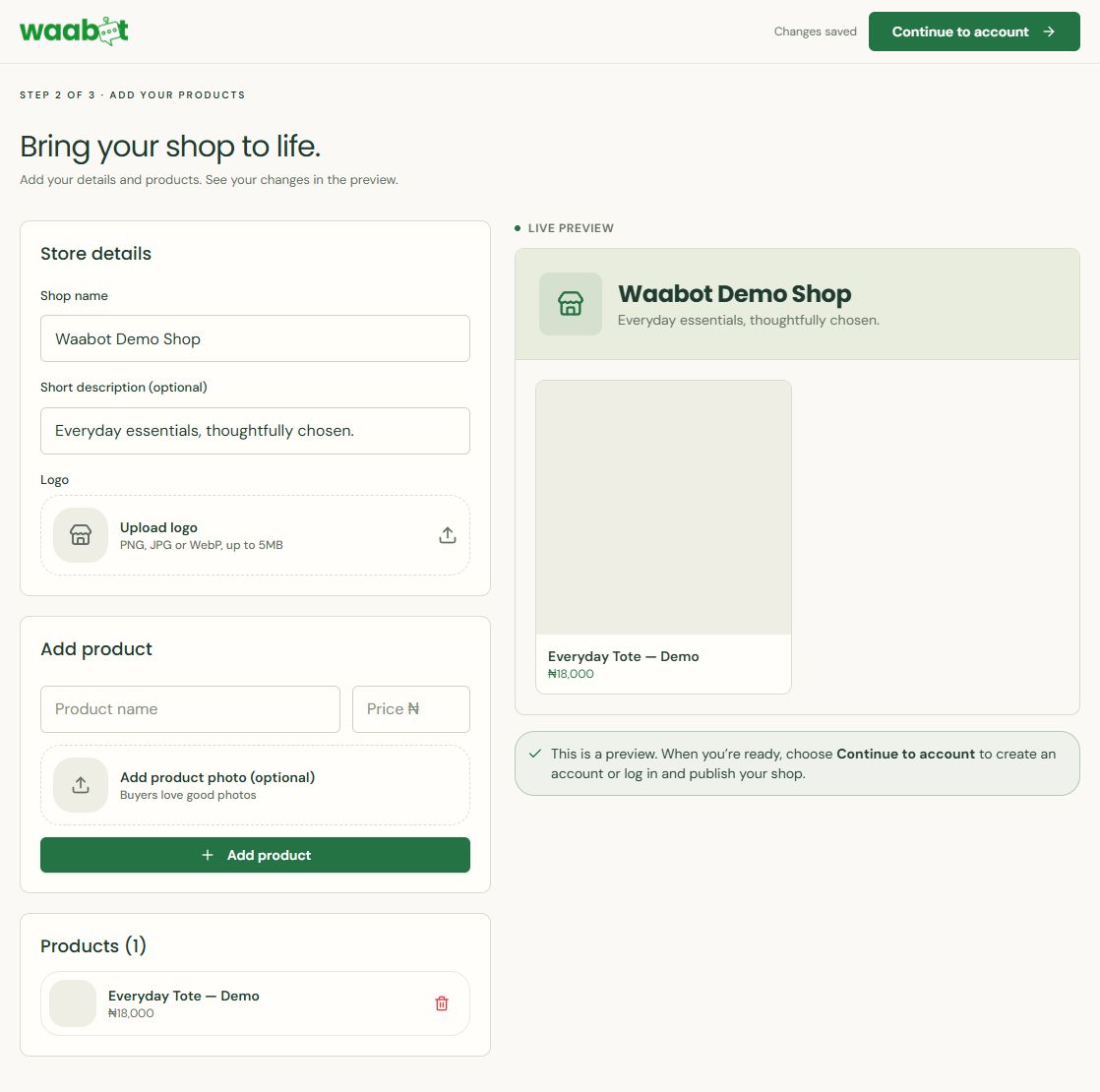
Choose Continue to account when the preview is ready. The next screen offers account creation or login for an existing account. Previewing a product does not confirm that your shop is published or ready to accept payments.
Upload photos, set prices, and add relevant sizes or colours. Keep stock quantities accurate so you know what is available to sell. A useful product description answers the questions customers would otherwise send in a message: what is included, the material or size, the available options, and how to use or care for the item.
Example: “Terracotta linen shirt — ₦18,000. Available in S, M and L. Lightweight fabric. Check the size measurements before ordering.” This is an example of product copy, not an offer from Waabot.
Use your own photos and show the item from more than one angle. Check that the price and selected variation match the product customers will receive.
Adding products after you sign in
In your dashboard, open Products and choose Add product. The form checked in September 2026 includes Name, Description, Category, Price (NGN), Stock, a Featured switch and an image Gallery. You can upload multiple images; the first is the main image. The form states that PNG, JPG and WebP images are supported, up to 5 MB each.
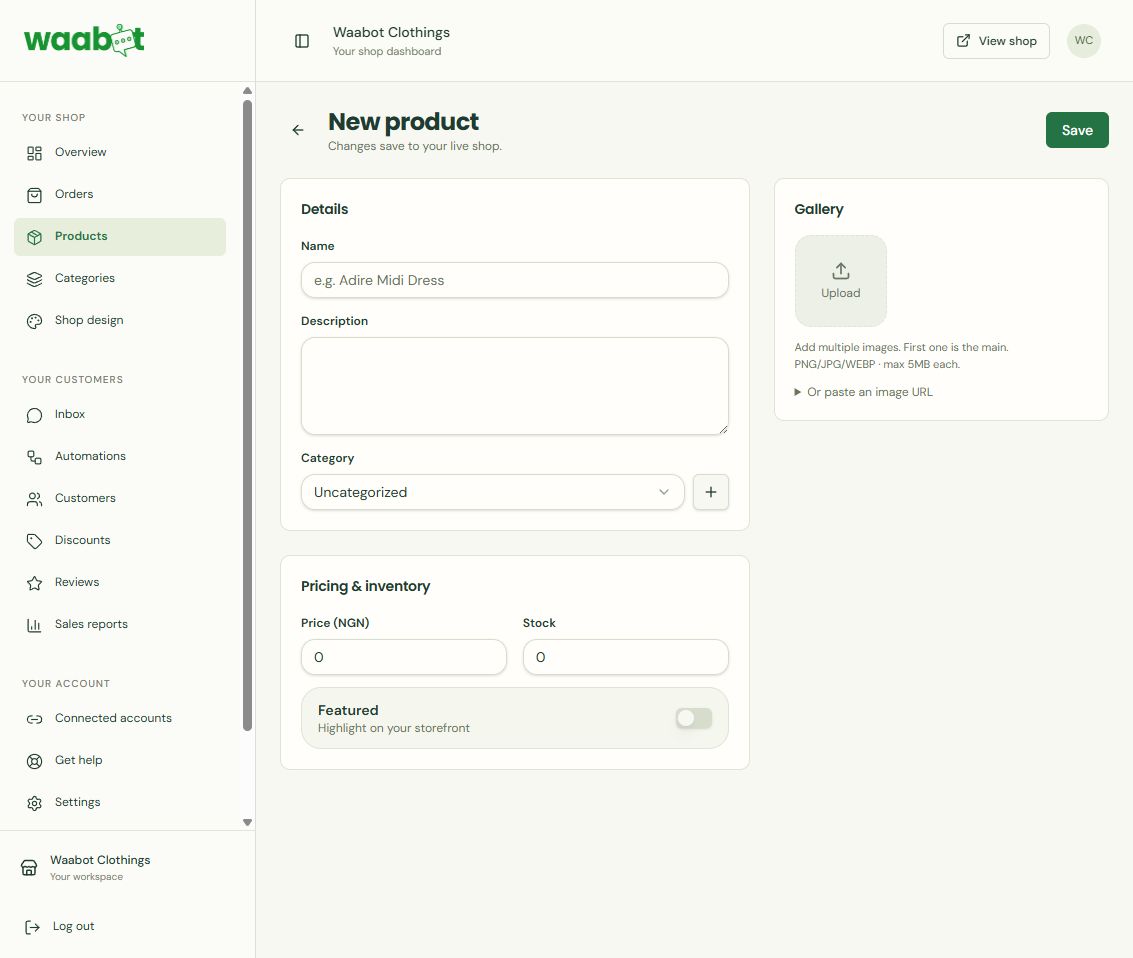
Review the details before choosing Save: the form states that changes save to your live shop. Include sizes and colours in the product description where needed; a separate variation selector was not present in this form.
3. Connect payments before taking orders
Waabot supports Naira payments through Paystack. Follow the payment connection prompts and complete any required account setup before inviting customers to pay. Review the payment provider’s current requirements and fees; creating a shop and processing a payment are separate parts of selling online.
Before promoting your shop, check the buying journey from a customer’s phone: open the shop, choose a product and review the checkout information. Confirm payment status in your dashboard before preparing an order.
4. Plan delivery and customer communication
Decide which locations you serve, how delivery charges are communicated, and when buyers should expect their items. Give customers a clear way to ask questions. Keep delivery and return information consistent wherever you advertise your products.
The Orders dashboard lets you filter progress by New, Confirmed, Shipped, Delivered and Cancelled. Keeping an order status current helps you organise fulfilment; it does not replace arranging delivery with your chosen service.
5. Share your store link on WhatsApp and Instagram
Copy the shop link provided by Waabot and open it yourself before sharing. Add it to your Instagram bio and share it through WhatsApp, Facebook or TikTok. Customers can browse products and pay through the store after following the link.
On WhatsApp, share a relevant product photo with a short description and the shop link. A practical message is: “Our new linen shirts are available. See sizes and prices, then order through our shop: [your shop link].” Replace the placeholder with your actual link.
You can continue answering questions in chat while using the online shop to show product details and collect orders. Sharing a link on WhatsApp is different from running a chatbot or automating WhatsApp messages.
6. Manage orders and stock
Check what was bought, who bought it and the payment status in your dashboard. Update the order as you pack and send it. Review stock after sales and keep customer details organised so you can resolve questions about an order.
Once the first products are ready, focus on getting the details right and fulfilling orders consistently. Expand the catalogue when you have a reliable routine.
Launch checklist
- Every product has a clear name, photo and correct Naira price.
- Sizes, colours and stock match what you can supply.
- Your payment account is connected and checkout details have been reviewed.
- Customers can find delivery, returns and contact information.
- Your shop link opens correctly on a phone.
- You know where to review payments and update order status.
Frequently asked questions
Do I need coding skills to create an online store?
No. Waabot provides a shop setup flow for adding products, accepting payments and managing orders without building a website from scratch.
Can I sell through WhatsApp without taking every order in chat?
You can share your Waabot shop link in WhatsApp. Customers follow the link to browse and order in the store, while you can use chat for questions.
Can customers pay in Naira?
Yes. Waabot supports Naira payments through Paystack. Connect your payment account before taking payments.
Is the store free, and can I set it up in five minutes?
Check the current signup terms for pricing and limits. The time needed depends on how many products you add and whether your photos, descriptions and payment account are ready.
Can I run ads from Waabot now?
Waabot’s product site currently lists integrated Facebook, Instagram and TikTok ad management as coming soon. You can already share your shop link through your social channels.
Choose your next selling guide
- How to Sell on Instagram in Nigeria Using an Online Shop
- 15 Product Description Examples for Clothes, Bags and Accessories
- How to Sell Clothes Online in Nigeria: A Launch Checklist
- How to Accept Online Payments in Nigeria for Your Small Business
Create your online store
Ready to put your products, payments and orders in one place? Create your Waabot shop, or explore the online store features before you start.
Conversation